Box-drawing utilities
🎨 Utilities to draw boxes on a webpage.
Annotated screenshots help the LLM think. We have observed that an optimal approach to get LLMs to navigate the web efficiently is to give them annotated screenshots. These screenshots feature a box, with a number, around every part of the page that the LLM can act upon: input elements and clickable elements.
- In practice, such screenshots will look like this:
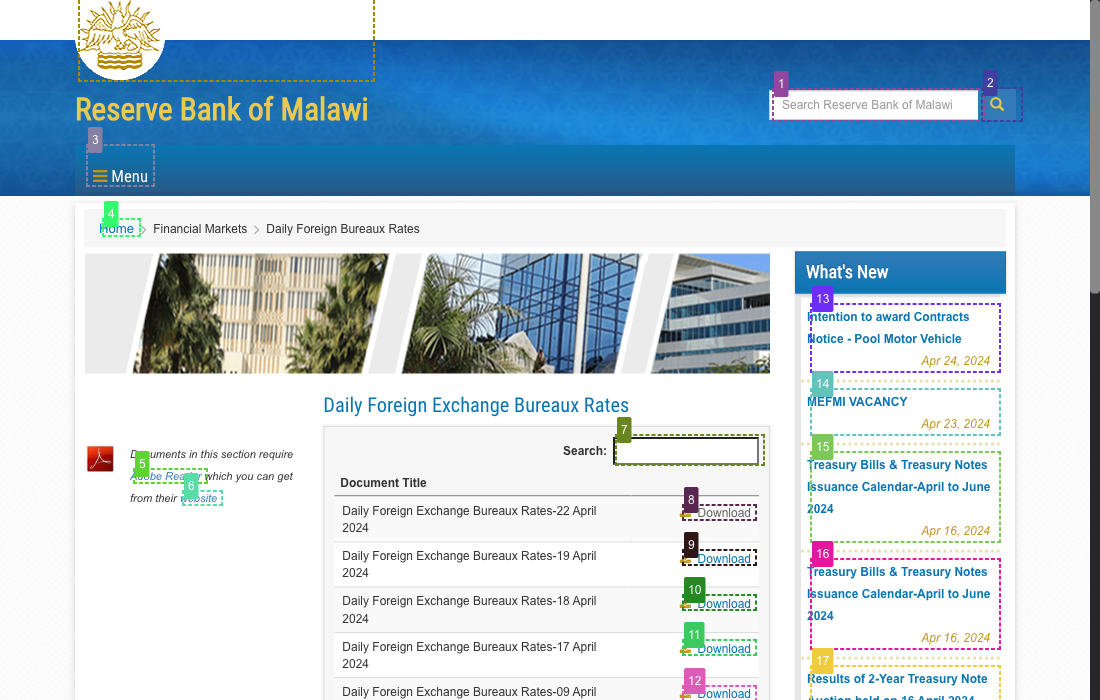
This module only draws boxes. You probably will want to use the screenshot utilities to retrieve an image of the webpage with these boxes.
from conatus.utils.browser import Browser
from conatus.utils.browser.post_processing import screenshot
from conatus.utils.browser.post_processing import draw


url = "https://inputtypes.com"
browser = Browser()
browser.goto(url)
page = browser.page
ss = page.last_screenshot
ss.save("tests/tmp/ss_no_boxes.png")
# Check it out screenshot doesn't feature any boxes

draw.draw_boxes(page)
ss, ss_b64 = screenshot.get_screenshots(page)
ss.save("tests/tmp/ss_boxes.png")
# Now ss features boxes
Additional references
- WebVoyager, a heavy inspiration for this module.
- API: Screenshot utilities: to retrieve images of the webpage with the boxes drawn.
Bases: TypedDict
Type for input and clickable nodes.
Bases: TypedDict
Type for a bounding box.
async

draw_boxes_async(
    page: Page | None = None,
    *,
    step: Step | None = None,
    chaos: bool = False
) -> None
Draw the boxes on the page.
The drawing is performed in the background. When a new page is loaded, the boxes will disappear.
| PARAMETER | DESCRIPTION |
|---|---|
page
|
The page to draw on.
TYPE:
|
step
|
The step to draw on. Note that
TYPE:
|
chaos
|
Whether to artificially crash the drawing. Here for testing. Defaults to False.
TYPE:
|
| RAISES | DESCRIPTION |
|---|---|
ValueError
|
If we detect an error in the bounding boxes list (e.g. the bounding boxes list is None or its length is not 4) |
Source code in conatus/utils/browser/post_processing/draw.py
Draw the boxes on the page.
More information can be found in the docstring of [draw_boxes_async](
conatus.utils.browser.post_processing.draw.draw_boxes_async), the async
sibling of this function.
| PARAMETER | DESCRIPTION |
|---|---|
page
|
The page to draw on.
TYPE:
|
chaos
|
Whether to artificially crash the drawing. Here for testing. Defaults to False.
TYPE:
|
Source code in conatus/utils/browser/post_processing/draw.py
async

undraw_boxes_async(page: Page) -> None
Undraw any boxes that have been drawn on the page.
| PARAMETER | DESCRIPTION |
|---|---|
page
|
The page to draw on.
TYPE:
|
Source code in conatus/utils/browser/post_processing/draw.py
undraw_boxes(page: Page) -> None
Undraw any boxes that have been drawn on the page.
More information can be found in the docstring of [undraw_boxes_async](
conatus.utils.browser.post_processing.draw.undraw_boxes_async), the async
sibling of this function.
| PARAMETER | DESCRIPTION |
|---|---|
page
|
The page to draw on.
TYPE:
|
Source code in conatus/utils/browser/post_processing/draw.py
get_input_click_nodes(
    inputs: dict[int, DOMNode],
    clickables: dict[int, DOMNode],
) -> dict[int, NodeInputClick]
Convert input and clickable nodes to a list that is easier to process.
| PARAMETER | DESCRIPTION |
|---|---|
inputs
|
The input nodes. |
clickables
|
The clickable nodes. |
| RETURNS | DESCRIPTION |
|---|---|
NodeInputClick
|
A tuple of the form
TYPE:
|
Source code in conatus/utils/browser/post_processing/draw.py
html_description_for_llm(
    all_nodes: dict[int, NodeInputClick],
) -> str
Returns a string representation of the nodes optimized for LLMs.
Alternative to the approach in Globot. See DOMNode.__repr__ for
more information.
| PARAMETER | DESCRIPTION |
|---|---|
all_nodes
|
The nodes to describe.
TYPE:
|
| RETURNS | DESCRIPTION |
|---|---|
str
|
The string representation of the nodes.
TYPE:
|