ARL: Actions 
☝️ This page explains Action as a concept.
- If you're looking for the API Reference, please go here:
ActionAPI Reference
Table of contents 
- Intro: Why AI agents need actions
- Quickstart: Converting a function into an
Action- Using the function after it's been defined as a tool (transparent passthrough)
defuse,with_config, etc.__call__vsexecute- passthrough mode
- Advanced: Writing an
Actionthat communicates with the LLM (and@Action.function) (Actually, you don't need to use it! But beware if you override a function fromAction)- Only one act func per class
typeify
ActionSchema, JSON Schema, and LLM Schemaoverride_type_hint_for_llm
- Type-checking
- Internals
- Marking the action function / Resolution of the action function
ActionBlueprintTypedActionvsActionandtypeify- Errors
- Resolution of type hints, parameters, signature
Intro: Why AI Agents need actions 
☝️ Already know how AI agents work? Feel free to skip this section.
One of the key capabilities of AI agents is their ability to perform actions. Every AI agent framework implements this capability in one way or another. 1
How AI agents use actions 
No matter the framework, the process typically follows this pattern:
- Runtime as orchestrator: The conversation between the user and the LLM is mediated by a computer program, which we will call runtime.
- Tasks and actions setup: At the outset, the user provides a task — for example, checking if it will rain — along with a set of actions that can be used to complete that task (e.g., searching the web).
- Action registry: The runtime maintains an action registry, which lists all available actions.
- LLM prompting: The runtime supplies the LLM with the task and the list of possible actions, prompting the LLM to either produce an answer or call an action. (See this prompt for an example.) For better performance, the list of actions often have to be passed to the LLM in a standardized JSON format.
- Action execution: If the LLM chooses to invoke an action, it signals it to the runtime in another standardized JSON format. The runtime executes the action, retrieves the result, and appends that result to the conversation.
- ...and repeat: Steps 4 and 5 are repeated until the LLM decides it has enough information to complete the task.
The AI agent sleight of hand 
As you can see, AI agents rely on a sleight of hand. While it seems that LLMs are performing actions, they in fact rely on the runtime to do so. Conceptually, executing an action is akin to calling a function in traditional programming.
In this setup, the AI agent behaves like a programming language: it's “calling”
functions it has access to, using them to manipulate information, store results,
and iterate until it achieves the desired outcome. ARL pushes this concept to
its logical conclusion.
2. Quickstart: Converting a function into an `Action`
   - Using the function after it's been defined as a tool (transparent passthrough)
   - `defuse`, `with_config`, etc.
   - `__call__` vs `execute`
   - passthrough mode
Quickstart: Converting a function into an Action 
Like in many AI agents framework, the first step is to transform your function into a more advanced data type XXXX
Unlike other frameworks, however, the result of that transformation will be XXX
# ... continuing from last cell
from conatus.actions.utils.errors import ActionWrongParamsError

assert add(1, 2) == 3

try:
  add(1)
except ActionWrongParamsError as e:
  print(e)
# ActionWrongParamsError: Errors while parsing the arguments:
# - Expected parameters:
#     - name: a, kind: POSITIONAL_OR_KEYWORD (1), is_required: True
#     - name: b, kind: POSITIONAL_OR_KEYWORD (1), is_required: True
# - Passed arguments: (1,), {}
# - Inferred arguments: ['a = 1']
# - Errors: Missing required positional or keyword argument: b
You get other bells and whistles.... XXX
# ... continuing from last cell

add.pretty_function_info()
# Function info:
# - Name: 'add'
# - Description: 'Adds a and b.'
#   - Parameter a:
#     - Description: <No description>
#     - Type hint: <class 'int'> (JSON OK)
#     -- Type of type hint: <class 'type'>
#     - Type hint shown to the LLM: 'int'
#     - Required: True
#     - Kind of parameter: POSITIONAL_OR_KEYWORD (1)
#     - Default value: <No default value>
#   - Parameter b:
#     - Description: <No description>
#     - Type hint: <class 'int'> (JSON OK)
#     -- Type of type hint: <class 'type'>
#     - Type hint shown to the LLM: 'int'
#     - Required: True
#     - Kind of parameter: POSITIONAL_OR_KEYWORD (1)
#     - Default value: <No default value>
#   - Returns:
#     - Description: <No description>
#     - Type hint: <class 'int'>
#     -- Type of type hint: <class 'type'>
#     - Type hint shown to the LLM: 'int'
Overview 
Summary 
In Conatus, an Action is the fundamental building block of a Recipe. It
essentially is a wrapper around Python functions, to which it adds important
features:
-
It auto-generates a documentation of the function, its parameters, and its return type to pass to the LLM.
-
It performs optional type-checking on inputs and outputs, which is generally important when dealing with unpredictable LLMs.
-
It enables the function to not simply return its result, but also to tell the runtime that the context passed to the LLM needs to be changed.
-
It is designed to be called by an AI agent as well as a traditional Python runtime. (This might not seem meaningful, but it is.)
Nevertheless, creating an Action is very easy. In fact, as long as you don't
care about (3) in the list above, the only thing you have to do is to add
@action decorator to the function you want to pass to the LLM.
Converting a function into an Action 
The simplest way to convert a function into an Action is to use the @action
decorator. If you use it in the most basic way, @action will look like it does
nothing:
from conatus import action
from duckduckgo_search import DDGS

@action
def search_web(query):
    return DDGS().text(query)

results = search_web("Chicago Bulls tickets")
assert results[0]["href"] == "https://www.nba.com/bulls/tickets"
In reality, search_web is now an Action under the hood. For instance, you
can print the JSON schema that will be passed to the LLM:
from conatus import action
from duckduckgo_search import DDGS

# Let's add type hints to see how this is reflected to the LLM
@action
def search_web(query: str) -> dict[str, str]:
    """Search web with DuckDuckGo and return the results."""
    return DDGS().text(query)

print(search_web.llm_schema())
# {
#     "name": "search_web",
#     "description": "Search web with DuckDuckGo and return the results.",
#     "input_schema": {
#       "type": "object",
#       "properties": {
#           "query": {"type": "string"}
#       },
#       "required": ["query"]
#     },
# }
Using with complex types 
A LLM can only communicate with the runtime with text or JSON. This means that
it can't pass around complex objects like a Browser object or a pandas
DataFrame. An Action can still handle this situation by telling the LLM to
pass such objects by reference. Here's an example:
from conatus import action
from pandas import DataFrame

@action
def row_wise_mean(df: DataFrame) -> DataFrame:
    """Calculate the mean of each row of a DataFrame."""
    return df.mean(axis=1)

@action
def column_wise_mean(df: DataFrame) -> DataFrame:
    """Calculate the mean of each column of a DataFrame."""
    return df.mean(axis=0)

@action(capture_print=True, passive=True)
def print_top_rows(df: DataFrame, n: int) -> None:
    """Print the top rows of a DataFrame."""
    print(df.head(n))

@action
def pandas_iloc_on(df: DataFrame, row: int, column: int) -> float:
    """Get the value of a cell in a DataFrame."""
    return df.iloc[row, column]

example_df = DataFrame([[1, 2], [3, 4]])

# This works
assert (row_wise_mean(example_df).values == [1.5, 3.5]).all()

# from conatus import AIRuntime
# runtime = AIRuntime(
#   actions=[row_wise_mean, column_wise_mean, print_top_rows, get_value],
#   variables = example_df,
#   task = "Calculate the total mean of all the cells in the DataFrame.",
#   output_type: float,
#   deterministic_return = True,
#   write = False,
# )
# runtime.run()
Pydantic validation models internals 
- We generate two Pydantic models for the validation of the inputs and outputs
(
input_modelsandoutput_models). These models are meant to be generated once. - We generate one Pydantic model for the JSON Schema that will be passed to the LLM. The most important part here is that we transform the variables that are of non-JSON serializable types to a reference to a variable that is known to us. This is generated once at action creation, but is recreated every time we tell the LLM it can execute the function (because enum).
How it's passed to the LLM 
- Strict mode -> Ensures that the output is correct -> If variable is not typed:
assumed it's a constant "bool, number, str" -> Remove additional properties ->
Remove
uniqueItemsand other properties that are incompatible with OpenAI's API. -> Change tuple to List (eventually I'll translate that to a TypedDict) ->dictthat have no set fields will be empty, essentially
Limitations 
We make some assumptions about your functions 
- In particular, we assume that if you mark a value with
Annotated[type, metadata], and one of the values in metadata is a raw string, we assume that the string is the description. And that this description is LLM-friendly (like AutoGen.) You can add other metadata markers, which will also be passed to the LLM. - If you pass a function that is within a class and has self as the first argument, we assume that it is an instance method.
For instance, the following function:
from typing import Annotated
from pydantic import Field

def divide(
    a: Annotated[float, "Numerator"],
    b: Annotated[float, "Denominator", Field(not_eq=0)]
) -> float:
  """Divide a by b."""
  return a / b
will be shown to the LLM like this:
Description: Divide a by b.
Arguments:
  a (float): Numerator
  b (Annotated[float, Field(not_eq=0)]): Denominator
Returns:
  (float)
Some functions are not accepted 
There are some functions that cannot be converted into an Action:
- Functions where one of the parameters has a
Nonetype hint. It's not clear how you would pass that to a LLM. - Functions where one of the parameters has a
...type hint. - For now, some functions where the arguments are types, or types of types, will
not work. For instance, an argument with type
ClassVar[ClassVar[X]]is probably not going to work. We might support this in the future, but it doesn't look like the sorts of functions that will be useful to LLMs. - If a function has both a
Yieldsand aReturnssections in the docstring, we will take whichever section comes first.
NOTE: Like other functions in this file, these methods meant to extract types and type hints are not fool-proof. Right now, they are implemented to work with a relatively wide amount of cases,
Function 'transparency' 
NOTE: Actually, let's just bite the bullet and only allow class methods, partly for design reasons (imagine if we have 100 Browser objects, each with 50 functions)
- For simple functions, the @
actiondecorator is essentially 'transparent'. This means that the function will behave as if it was not decorated, except that it will be useful by LLMs and that type-checking will be provided. - For class methods, things are not so simple. Class methods belonging to a
class need, by definition, the first argument to be an instance of the class.
This is fine if the class is an
Actionor one of its subclasses -- we control these. But if the class is not anAction, we need to find a way to pass that instance as an argument, either explicitly or implicitly. - Here's why this happens: when you create a method within a class, every time a
new instance of the class is created, the rest of the instance and the method
are connected. This happens essentially through the
__init__()function. But when you put the@actiondecorator on a method, that link is essentially severed, because the underlying function is now anAction. So you will need to re-establish the link, unless you've already created the instance.
Concretely:
from conatus.actions import action

from dataclasses import dataclass


@dataclass
class YearsSince:
    reference_year: int = 1970

    def calculate_years_since(self, year: int) -> int:
        """Calculate the number of years since the reference year."""
        return year - self.reference_year


# An instance of ArbitraryClass is 'baked' into the new action
years_since_action = action(YearsSince().calculate_years_since)
years_since_action(2024)  # Will return 54

# No instance is baked into the new action
# This means that you have to instantiate the class. It is more rigorous,
# but it gives you more flexibility.
years_since_action2 = action(YearsSince.calculate_years_since)
years_since_action2(YearsSince(reference_year=2000), 2024)  # Will return 24

# Let's redefine the class, but now with the decorator inside it
@dataclass
class YearsSince:
    reference_year: int = 1970

    @action
    def calculate_years_since(self, year: int) -> int:
        """Calculate the number of years since the reference year."""
        return year - self.reference_year

# Creating an instance of a class here does nothing. You will
# have to re-instantiate the class.
years_since_action3 = YearsSince().calculate_years_since
years_since_action3(YearsSince(), 2024)
years_since_action4 = YearsSince.calculate_years_since
years_since_action4(YearsSince(reference_year=2000), 2024)  # Will return 24
Callables are not checked 
If one of the arguments of your function is itself a function (a Callable),
the only 'hard' check that will be performed by Pydantic is that the argument is
callable. The arguments themselves won't be checked. It's known behavior from
Pydantic:
Pydantic doc
Dealing with circular imports 
We use Pydantic to perform type-checking on the inputs and outputs of the action. This has one main limitation: if you use a forward reference to circumvent circular imports, you will have to write a wrapper function around it to make it work.
For example:
# module_a.py
from module_b import ClassB

# module_b.py
import typing
if typing.TYPE_CHECKING:
    from module_a import ClassA

class ClassB:
    def do_something(self, a: "ClassA") -> None:
      """Do something with a."""
      pass

# module_c.py
from conatus.actions import action

# This will fail
action_do_something = action(do_something)
Instead, you should do this:
# module_c.py
from conatus.actions import action
from module_a import ClassA

# This will work, but it will not import the docstring from
# the original function
@action
def action_do_something(a: ClassA) -> None:
    return do_something(a)
If you're curious, here's why this is happening:
- When you use
@action, we create a PydanticBaseModel. This model is created in theconatus.action.actionmodule, because it is created within theActionclass. - If the type hints in the function refer to types that have already been imported or created, everything is fine. But if you use a forward annotation (e.g., a string), Pydantic will almost certainly not know what it is. 2
- What Pydantic does in this situation is that it will silently freeze the creation of the model, and wait for a more opportune time. For instance, if you were to validate the model later in your script, it would look again for types that have been imported. This is what's called model rebuild.
- The problem is that, when Pydantic does so, it looks for the references in the
module where the model has been defined -- that is
conatus.action.action. We then have to manually import the module where the function has been defined, which here ismodule_b. If the forward reference is about a type that is imported later in the module, it's fine. But if the forward reference exists to avoid circular imports, this will not work, because during executiontyping.TYPE_CHECKINGwill be False. - We perform model rebuild when we create the
Actionclass, because we need to retrieve the model schema in its entirety before calling the action. - The solution, then, is to create a function in a module where it is safe to import the type that causes circular imports.
type-checking 
While Actions can perform some type-checking at runtime, they don't play well
with the traditional Python type checkers. If type safety correctness is
important to you, you might want to read this section.
Consider this:
from typing import reveal_type

class NormalAction(Action):
    @action
    def normal_action(self, x: int) -> int:
        return x * 2

result = NormalAction(10)
reveal_type(result) # Pyright will say this is a `NormalAction` object
print(result, type(result)) # This will print `20 <class 'int'>`
print(result + 2) # Will succeed, even though Pyright and mypy say it's impossible
# Alternative 1: cast or assert
# This will ensure that the type checker knows that the result is an int,
# but it will not prevent potential runtime errors.
from ty  <!-- 🪫 -->
ping import cast

result = cast(int, NormalAction(10))
assert isinstance(result, int)

# Alternative 2: delay the runtime execution
# This way, the result is only given from a function that is not __new__(),
# and therefore will return `Any`.
result = NormalAction.init_without_execute().explicit_execute(15)

# We also provide statically checked Action classes

# Alternative 3: `TypedReturnAction` guarantees the return type.
# This is enough if you only care about handling the result of the `Action`.
# But if you want to check the inputs you give to the `Action`, this will not
# be enough
from conatus.actions import TypedReturnAction

class ActionWithIntReturn(TypedReturnAction[int]):
    @action
    def action_with_int_return(self, x: int) -> int:
      return x * 3

result = ActionWithIntReturn(100)
reveal_type(result) # Pyright will say `int`, mypy will say `ActionWithIntReturn`
result = ActionWithIntReturn.init_without_execute().explicit_execute(100)
reveal_type(result) # Pyright and mypy will say `int`
# result = ActionWithIntReturn(100, "string") # Will fail at runtime

# Alternative 4: `TypedAction` guarantees the return type and the input types.
# The main downside is that you can only define ONE input.
# If you need to define multiple inputs and have them checked, consider
# using a Pydantic BaseModel or a TypedDict.
from conatus.actions import TypedAction

class ActionWithIntInputAndReturn(TypedAction[int, int]):
    @action
    def action_with_int_input_and_return(self, x: int) -> int:
      return x * 3

result = ActionWithIntInputAndReturn(100)
# result = ActionWithIntInputAndReturn(100, "string") # Pyright will throw an error
reveal_type(result) # Works with Pyright
result = ActionWithIntInputAndReturn.init_without_execute().explicit_execute(100)
reveal_type(result) # Works with Pyright and mypy

# Alternative 5: `TypedComplexAction` can let you define the return type and the
# specification of the input parameters. We use Python's `ParamSpec` under the
# hood. It's still an imperfect solution:
#   - it has the relatively awkward syntax of `Concatenate`
#   - it has to accept a `...` in the input parameters, which means that
#     additional arguments beyond the pre-defined ones will still be accepted.
#   - it is fundamentally made for positional arguments.
from conatus.actions import TypedComplexAction
from typing import Concatenate

class ComplexCalculation(
    TypedComplexAction[Concatenate[int, float, str, ...], float]
):
    @action
    def my_action(self, x: int, y: float, label: str = "default") -> float:
        """Complex calculation with multiple arguments."""
        print(f"Label: {label}")
        return x * y
Goals 
- Provide a stable interface in which essentially any arbitrary Python function can be transformed to be used smoothly by a LLM and a Conatus script.
- Provide optional type-checking to the inputs and the outputs through Pydantic.
- Infer the fully typed signature of the parameters, as well their description, through various mechanisms (docstrings, annotations, type hints)
- Convert the signature of the function to a JSON schema that can be passed to a LLM.
- This JSON schema should tell LLMs to explicit set the value of every variable that is JSON serializable, and for the other ones reference a variable known to Conatus that is of the correct type.
Non-goals 
- Support async functions (for now).
- Support overloaded functions (for now).
Background 
Context 
Existing solutions 
What should be the requirements of the new system 
Idea dump:
- Core concept of agent: tool use with actions that can be called through JSON schemas
- A lot of libraries make use of that concept:
pydantic-aiuses theretrieverconceptlangchainuses thetoolconceptautogenalso uses the concept oftool.
- The problem with these libraries is that they essentially assume that all actions can have JSON-serializable input and output. But not every useful function is like that.
- Concept of 'pass by value' and 'pass by reference'
- We need to de-couple the actual function that's run from the JSON schema that can be passed to the LLM.
🧱 Basic bricks: The essential building block of ARL is an Action: a
modular piece of code that is meant to be called by an AI agent.
- If you've dabbled with AI agents before, an action is similar to a function call or a tool.
- An
Action== a function in ARL.
Examples of actions include:
- going to a URL,
- sending an email,
- extract data from a webpage
- etc. You can define your own
Action!
💪 Strongly typed: Actions define their inputs and outputs with explicit
types: typical types like str, int, or Conatus-provided types like HTML or
Browser.
In Python, an action roughly looks like this:
# NOTE: VERY simplified. If you want to make your own action,
# please refer to "How-To: Make your custom Action"

class GoTo(Action):
    pythonic_name: str = "goto"
    inputs: ActionIn = ActionIn(
        ActionParam(name="url", type=str, required=True),
        ActionParam(name="browser", type=Browser, required=True, implicit=True),
        ActionParam(name="expects_dl", type=bool, required=False)
    )
    outputs: ActionOut = ActionOut(
        ActionParam(name="browser", type=Browser, implicit=True)
    )

    def setup() -> None:
        # Setup code...

    def execute(self, inputs: ActionIn) -> ActionOut:
        browser = inputs.get("browser")
        browser.goto(inputs.get("url"))
        # We can also define StateUpdate (see later in the doc)
        return ActionOut(browser)
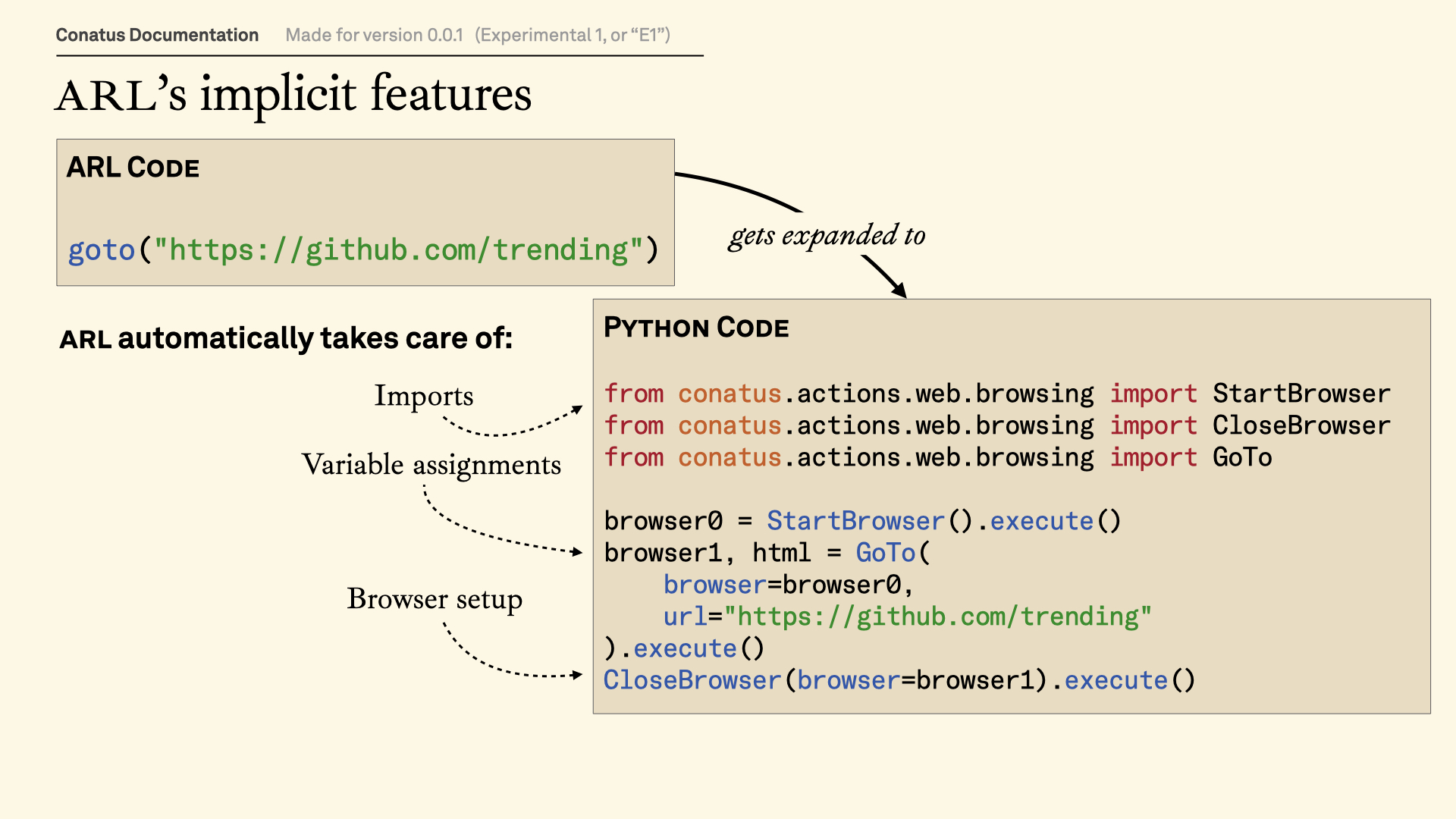
Or, to put it graphically:
Let's look at this in detail!
Why do we need Actions? 
One of the key design philosophies in Conatus is that the behavior of AI agents needs to be bounded and modularized. Actions are a key element to make this happen.
- Actions are supposed to be independent from one another. You should design them that way.
🎁 Actions are essentially a wrapper around a strongly-typed function. In fact, actions are meant to be used as functions, not as classes.
- Unless you are debugging, an
Actionis not going to be called through the Python library, but either through ARL or an AI agent. Both think ofActions as functions.
The Action class (alongside ActionParam, ActionIn, and ActionOut) is
here to:
- Ensure that the action can be properly executed,
- Perform setup actions if need be,
- Verify the input and output parameters conform to the typing of the actions.
Note: Soon, a Recipe will be able to be an action.
Defining parameters with ActionParam 
💝 More wrappers! ActionParam, ActionIn and ActionOut act as wrappers
around the input and the output of the action.
ActionParamchecks that every parameter is properly defined;ActionInchecks that the parameters work well together (e.g. they don't have the same name);ActionOutchecks that the Action actually returns the right parameters, and also communicates additional information to the LLM (see below).
😭 Do we need these wrappers? Yes, we do. We're essentially implementing a programming language, and these constructs help us do the job of a compiler.
What are Actions? 
Actions are (kind of) functional 
setup() (and maybe setup_all() for all instances of a class)
A subtlety is that ActionIn ≠ List[ActionParam]. The reason for it is that we want inputs and outputs to be declarative...
ActionIn and ActionOut
CPUExecute and AIExecute
-
If you have already used such a framework, you might have encountered this concept under another name. Pydantic AI refers to actions as retrievers, LangChain refers to actions as tools, while OpenAI talks about function calling. ↩
-
The exception is if the forward reference matches a type that is accessible within the
Action, but that is basically useless. ↩