AI Messages: Inputs / Outputs Data Structures 
Because Conatus works across multiple AI providers, it needs to be able to represent all AI inputs and outputs. This document covers the core data structures for everything you send to the AI model, everything you get back, and all the objects that appear in between (such as messages, content parts, tool calls, and usage).
See also
- AI Models (overview) for a
high-level introduction to classes such as
OpenAIModel. - AI Messages (API reference) for details on the message hierarchy and examples.
- Content Parts (API reference) for a deep dive into message content.
- Tool Calls (API reference) for tool-call APIs (including computer use).
- Streaming and Incompletes (API reference) for streaming/partial responses.
Summary of the main data structures 
| Concept | Class(es) | Purpose |
|---|---|---|
| Input prompt | AIPrompt |
The entire user input to an AI model |
| Messages | AIMessage, UserAIMessage, etc. |
Individual utterances, both in and out |
| Content parts | UserAIMessageContentPart |
Structure of (possibly multi-media) message content |
| Tool calls | AIToolCall, ComputerUseAction |
Requests from the AI to execute code (functions, tools) |
| Output/response | AIResponse |
Everything the AI model returns (messages, tool calls, etc.) |
| Streaming (WIP) | Incomplete* |
For partial/resumable/streamed results |
| Usage/cost | CompletionUsage |
Track tokens, model name, and pricing |
Unsupported (for now)
The following concepts are not yet supported:
- Audio messages (inputs or outputs)
- Image outputs (inputs are fine)
- Citations / references
- File uploads
Visual overview 
This diagram shows the hierarchy of the main classes:
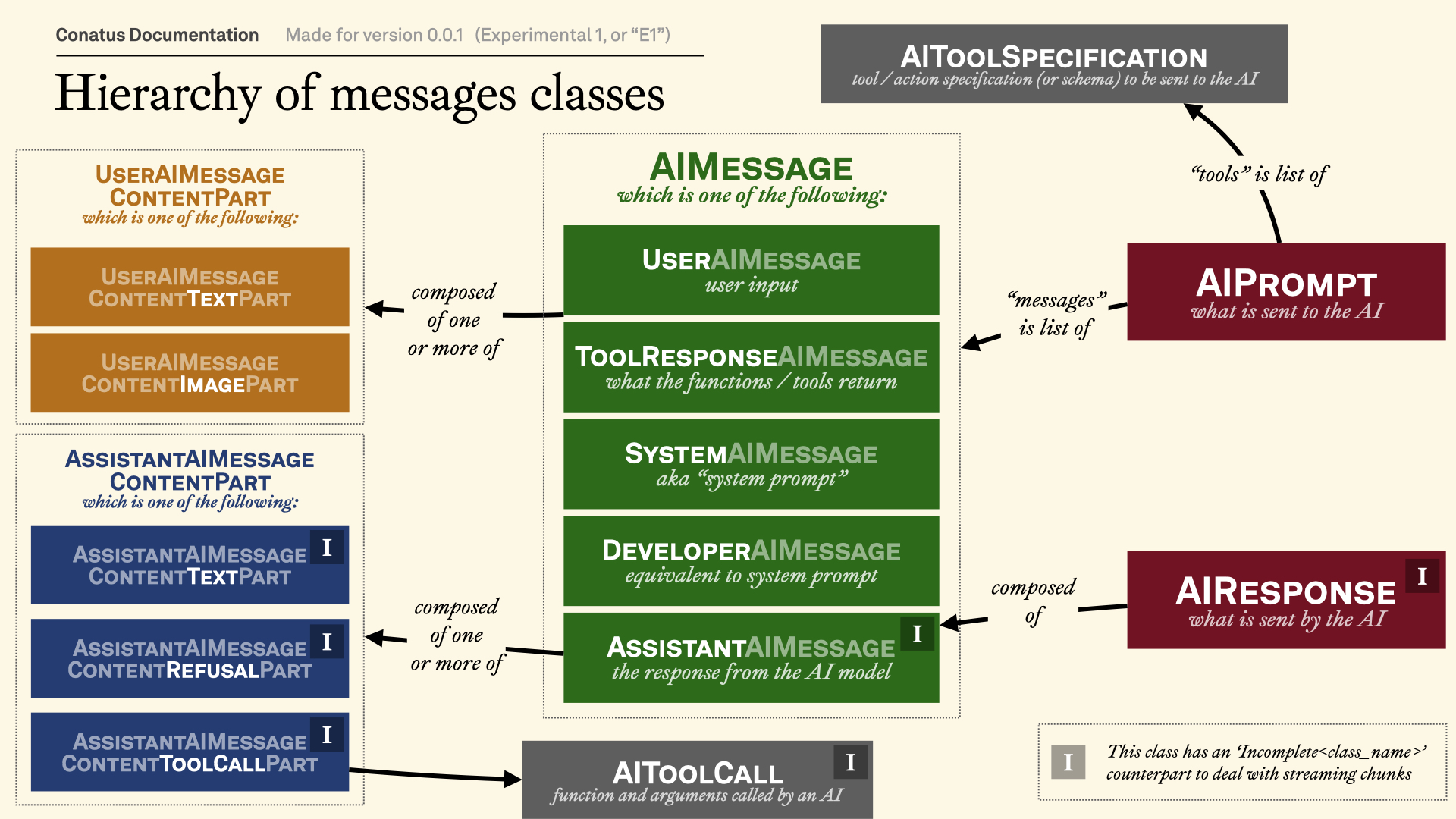
Accordingly, we'll start first by looking at the (in
red)
AIPrompt class and
AIResponse classes, since
they are the main data structures you'll be using.
We'll then go one level below with the various
AIMessage subclasses. (in
green)
Finally, we'll look at the (in
orange)
UserAIMessageContentPart
and (in blue)
AssistantAIMessageContentPart
classes, which are the building blocks of message content.
We will also look at the (in
gray)
AIToolCall and
ComputerUseAction
classes, which are the building blocks of tool calls.
The Input: AIPrompt Structure 
(Once again, we're talking here about the messages in red in the image above.)
The AIPrompt class is the
single entry point for everything you send to the AI model. It is designed to
be flexible and extensible, handling:
- Message histories (
previous_messages,new_messages) - System/developer messages (
system) - Tool/function call specifications (
tools,actions). These are converted to anAIToolSpecificationobject, which is essentially a wrapper around a pydantic JSON schema. - Output schemas/structured output formats
- "Computer use" configuration (for browser or simulated agent interfaces)
from conatus import AIPrompt, action

@action
def my_adder_function(a: int, b: int) -> int:
    return a + b

prompt = AIPrompt(
    user="What's the sum of 2 and 2?",
    system="Be concise.",
    actions=[my_adder_function],               # For tool use
    output_schema=int,            # Request structured output
)
There are three ways to initialize the
AIPrompt class:
- Simple, new conversation: Pass a string to
user. This will create a new conversation with a single message. - Conversation with multiple messages: Pass a list of messages to
messages. This will create a new conversation with the given messages. - Conversation with history: You can make a distinction between previous
and new messages. This is helpful because some AI providers (like OpenAI's
Responses API) allow to send only new messages, as long as you provide a
previous messages ID. In this case, you need to pass (1) a list of
new_messagesas well as (2) a list ofprevious_messages,previous_messages_id, or both.
In each case, you can optionally pass a system message with system, a list of
tool specifications with tools, a list of actions with actions, and an
output schema with output_schema.
For more information, see AIPrompt's API reference.
Example: Passing actions as tools 
from conatus import action, AIPrompt

@action
def add(a: int, b: int) -> int:
    return a + b

prompt = AIPrompt(
    user="Add 100 and 23.",
    actions=[add],
    system="Use tools if needed.",
)
Example: Structured output 
from conatus import AIPrompt
from typing_extensions import TypedDict

class MenuItem(TypedDict):
    name: str
    price: float

prompt = AIPrompt(
    user="Give me 3 coffee drinks with prices.",
    output_schema=list[MenuItem],
)
Example: Conversation history 
from conatus import AIPrompt
from conatus.models.inputs_outputs.messages import UserAIMessage, AssistantAIMessage

prompt = AIPrompt(
    previous_messages=[
        UserAIMessage(content="What's 5+7?"),
        AssistantAIMessage.from_text("12"),
    ],
    new_messages=[
        UserAIMessage(content="What about 8+9?")
    ],
    # This is the ID of the previous response,
    # which is given by some AI providers (e.g. OpenAI's Responses API)
    previous_messages_id="resp_123",
)
Once again, for more, see AIPrompt's API reference.
The Output: AIResponse Structure 
(Once again, we're talking here about the messages in green in the image above.)
The AIResponse class
encapsulates everything returned by an AI model call. This includes:
- The full original prompt context
(
prompt) - The AI's message received
(
message_received) and its text content (all_text) - Any tool calls embedded in the reply
(
tool_calls), as well as any code snippets that were present in the AI's message (code_snippets) - Usage statistics (tokens/cost/model)
(
usage,cost) - Structured output
(
structured_output) if an output schema was requested and the model returned structured output - Finish reason
(
finish_reason), UID (uid), and more
from conatus import AIPrompt
from conatus.models import OpenAIModel

model = OpenAIModel()
prompt = AIPrompt(user="What's the sum of 2 and 2?")
response = model.call(prompt)
print(response.message_received) # The AI's message (as an AssistantAIMessage)
print(response.all_text)         # The text content of the AI's message
print(response.code_snippets)    # Any code snippets in the text
print(response.tool_calls)       # Any requested tool calls
print(response.structured_output)  # Parsed to the requested schema/type
print(response.usage)           # Tokens/cost info
For more information, see AIResponse's API reference.
Message Hierarchy (AIMessage) 
(Once again, we're talking here about the messages in green in the image above.)
Messages are the backbone of any conversation. Conatus represents them via a class hierarchy:
SystemAIMessage: Also known as "developer message" or "instructions".UserAIMessage: User input (stror multi-part content composed of images and text chunks)AssistantAIMessage: AI assistant's reply, itself composed of text chunks, reasoning chain-of-thoughts, refusal objects, and tool callsToolResponseAIMessage: Results of a tool call execution, which transmits the tool call's output to the AI model.
Here's an example of a simple conversation:
from conatus.models.inputs_outputs.messages import UserAIMessage, AssistantAIMessage

m1 = UserAIMessage(content="Hi!")
m2 = AssistantAIMessage.from_text("Hello. How can I help you?")
Message (Content) Parts 
Many messages (especially those going to/from models like OpenAI/Anthropic) may contain rich, multi-part content, not just text:
- Text (multi-part or segmented)
- Images (base64 or URLs)
- Tool calls (serialized commands)
- Refusals, rationale, etc.
Conatus has standardized "content part" classes for both users and assistants.
User Message Content Parts 
(Once again, we're talking here about the messages in orange in the image above.)
UserAIMessageContentTextPart: Text snippet, may be linked to an imageUserAIMessageContentImagePart: Image (base64or URL)
from conatus import AIPrompt
from conatus.models import OpenAIModel
from conatus.models.inputs_outputs.messages import UserAIMessage
from conatus.models.inputs_outputs.content_parts import (
    UserAIMessageContentTextPart,
    UserAIMessageContentImagePart,
)

URL = "https://upload.wikimedia.org/wikipedia/commons/thumb/8/85/Tour_Eiffel_Wikimedia_Commons_%28cropped%29.jpg/1280px-Tour_Eiffel_Wikimedia_Commons_%28cropped%29.jpg"

image_part = UserAIMessageContentImagePart(image_data=URL, is_base64=False)
text_part = UserAIMessageContentTextPart(text="Where was this picture taken?")

m = UserAIMessage(content=[text_part, image_part])

prompt = AIPrompt(messages=[m])
model = OpenAIModel()
response = model.call(prompt)
print(response.all_text)
# > This picture was taken in Paris, France, featuring the Eiffel Tower.
Assistant Message Content Parts 
(Once again, we're talking here about the messages in blue in the image above.)
AssistantAIMessageContentTextPart: Text snippetAssistantAIMessageContentToolCallPart: Tool call requestAssistantAIMessageContentRefusalPart: Refusal to answerAssistantAIMessageContentReasoningPart: Reasoning chain-of-thought (might not contain any text).
See Content Parts for more details.
Tool Calls 
(Once again, we're talking here about the messages in gray in the image above.)
Tool calls allow the AI to ask the runtime to invoke a function, perform a computer use action, or otherwise call tools.
Function/Tool Calls 
AIToolCall is the
protocol-agnostic structure:
name: Function/tool name to callreturned_arguments: Arguments, which can be passed as a dict or a string.call_id: Which needs to be mentioned when we pass back the result of the tool call to the AI model.
The arguments are accessible as dict or str via two helper properties:
Computer Use Actions 
Some providers (OpenAI/Anthropic) sometimes use special tool calls to perform
computer use actions. We unify them under the
ComputerUseAction
family:
- Simulates clicks, typing, scrolling, screenshots, etc.
- Each type (e.g.,
CULeftMouseClick) is adataclasswith clearly specified fields
Note that these computer use objects are somewhat tightly linked to the
Runtime class, which is responsible for
executing tool calls. In particular, the
ComputerUseAction
objects requires a
environment_variable
argument that refers to a
RuntimeVariable object.
These tool call objects appear in assistant messages as content parts, and may show up in responses (and can be passed to the execution/runtime subsystem).
See Tool Calls for more details.
Usage and Cost Tracking 
Each AI response may have usage and pricing statistics attached.
CompletionUsage
records:
model_name: The name of the model usedprompt_tokens: The number of tokens in the promptcompletion_tokens: The number of tokens in the completiontotal_tokens: The total number of tokens- Special fields for cached tokens
(
cached_used_tokens, etc.) - Extendable extra fields (e.g. reasoning tokens, etc.)
Note that you can add
CompletionUsage
instances together, which is useful for accumulating usage during streaming.
Finally, the cost
property can be used to compute the cost of the response. This requires that the
model name and prices are present in the conatus.models.prices module.
Streaming and Incomplete Structures 
To handle streaming/partial results, Conatus provides a family of Incomplete*
classes.
- You can add them together with
+(e.g., combine chunks of output) - Each has a
.complete()method which "finalizes" an object (for example, turning a partial message into a properAssistantAIMessage) - Handles merging text/tool calls smartly.
This protocol is crucial for implementers writing streaming adapters for new models/APIs.
See Streaming and Incompletes for more details.
API Reference Summary 
These documentation pages provide full auto-documentation for each data structure and its methods:
- AI Prompt and Response
- Messages
- Content Parts
- Tool Calls
- Streaming Incompletes
- Usage and Cost Tracking
Where do I start if I want to implement my own model/provider? 
See How-To: Add a new AI provider and refer to
the BaseAIModel API docs for the expected protocols
and required conversions.